B
Billing Saathi

Smart GST Billing &
Accounting for
Every Business

Create GST invoices, manage inventory, track IMEI for mobile products, and file GST returns — all in one place. Works for any business type.

10k+
Businesses
5L+
Invoices
GST
100% Compliant
IMEI
Mobile Tracking

GST Billing

Professional tax invoices with CGST/SGST split across all GST slabs (0%, 5%, 12%, 18%, 28%)

IMEI Tracking

Mobile products require IMEI before bill generation. Full traceability for every handset sold

Stock Management

Real-time inventory with low-stock alerts, purchase tracking and category management

GST Reports

GSTR-1 ready reports with invoice-wise and slab-wise breakup for easy filing

Print Invoices

A4 print-ready GST invoices with IMEI details, amount in words and authorised signatory

P&L Reports

Track revenue vs purchase cost, gross profit, margins and top-selling items

Expense Tracking

Log rent, electricity, salaries and other business expenses by category

Customer Management

Maintain customer database with GSTIN, contact info and full purchase history

Secure Login

Each user gets their own business data. Password-protected with session management

GST Billing

Generate compliant GST invoices in 30 seconds

Whether you sell mobile phones, groceries, electronics, clothing, or any other category — Billing Saathi handles the full GST workflow for you.

  • Multi-line invoices with HSN codes, qty, rate, GST slab and discount per item.
  • Automatic CGST + SGST split for intra-state, IGST for inter-state, with the right slab applied per item (0%, 5%, 12%, 18%, 28%).
  • Customer auto-fill — type a phone number, and the customer's name, GSTIN and address fill in.
  • IMEI capture required before save for mobile products — every handset is traceable.
  • A4 print-ready PDF with your logo, signature, stamp and amount-in-words.
  • Pending payment tracking with automatic overdue badges (e.g. "50d overdue").
Invoice #INV-0143 PAID
Milan Patel+91 98xxx xx100
iPhone 15 Pro 128GB₹1,29,000
· IMEI: 35742XXXXX98765
USB-C Cable₹599
Subtotal₹1,09,829
CGST 9% + SGST 9%₹19,770
Total₹1,29,599
Stock & Inventory

Never run out — never overstock

Live stock counts that update the moment you sell or receive goods. Categories, low-stock alerts, IMEI pools, and supplier links all in one place.

  • Real-time stock — quantity drops on each sale, rises on each purchase bill, instantly.
  • Low-stock alerts on the dashboard so you know what to re-order.
  • Categories — General, Mobile, Charger, Accessories, plus your own custom categories.
  • Custom items typed directly on a bill auto-save to your stock list.
  • IMEI pool — every IMEI you receive is tracked; the system blocks selling the same IMEI twice.
  • Duplicate detection — the system warns you if an item with the same name already exists.
Stock3 low-stock
iPhone 15 Pro 128GB24
Samsung S24 Ultra12
USB-C Charger3
Tempered Glass48
GST & P&L Reports

Filing-ready reports — copy & paste into the GST portal

The GST report does the math for you and produces GSTR-1 ready data: invoice-wise breakup, slab-wise summary, and net liability after input tax credit.

  • Output GST — total taxable, CGST, SGST grouped by slab (5/12/18/28%).
  • Input GST from purchase bills — your eligible Input Tax Credit, ready to claim.
  • Net liability = Output − Input. Already calculated. Just verify with your CA.
  • Invoice-wise GSTR-1 table with all the columns the portal asks for.
  • P&L shows revenue, purchase cost, expenses, gross profit, margin %, top selling items, top purchase items.
  • Quick filters — Today, This Month, This Year, All Time. Or pick any custom date range.
GST Report — Oct 2025
Output GST
₹86,400
Input GST
₹62,150
Net Payable
₹24,250
Slab 18%₹4.2L taxable → ₹75,600 GST
Slab 12%₹85K taxable → ₹10,200 GST
Slab 5%₹12K taxable → ₹600 GST

Get started in 3 steps

1

Sign up & set up your business

Create an account, fill in your business name, GSTIN, address, logo, signature and bank details. Takes ~3 minutes.

2

Add stock or import existing data

Add products one by one or import via CSV/JSON. Use Purchase Bills to bring in supplier invoices and stock at the same time.

3

Start billing & reporting

Create GST invoices, capture IMEIs, track payments. At month-end, the GST & P&L reports are already done for you.

Frequently asked questions

Is the 1-month trial really free?

Yes. No credit card needed. Start it anytime from Settings › Free Trial and every Premium feature is unlocked for 1 month. After that you keep using Billing Saathi on the Free plan, or upgrade to Premium for ₹999/year or ₹2,499 for 3 years. Each email address and mobile number can use the free trial once.

Does it work for businesses other than mobile shops?

Absolutely. The IMEI feature is optional — for mobile/electronics products, enable "Require IMEI" on the item; for everything else (groceries, clothing, services, FMCG, medical, stationery), just leave it off and bill normally.

Are the invoices GST-compliant?

Yes. Each invoice has HSN codes per item, taxable value, CGST/SGST/IGST as applicable, total in words, your business GSTIN and signatory line. The GST Report tab gives you GSTR-1 ready data in the exact format the portal expects.

What happens to my data when my plan expires?

Nothing. Your data stays exactly where it is. You just lose access to the dashboard until you renew. The moment you re-activate, all your invoices, stock, customers and reports are right there.

Can I export my data?

Yes. The Data I/O section lets you export everything as JSON (full backup) or CSV (per-table). You can also import a previous backup back in.

How is payment processed?

All paid plans go through WooCommerce on this same site, secured by SSL. UPI, cards, net banking — whatever payment methods you've set up in WooCommerce will work.

Start billing in the next 5 minutes

Free for 1 month. No card. Cancel anytime.

Copyright ©2026 Billing Saathi. All Rights Reserved. Made With ❤ by Diginest Websolution
B
Billing Saathi
Welcome back
Sign in to your dashboard
Forgot password?
Forgot Password
Enter your account email and we'll send you a reset link.
Check your email
If that email is registered, a reset link has been sent. Check your inbox (and spam folder).
Set New Password
Choose a strong new password for your account.

GST Ready
Billing & Inventory
for Every Business

Manage sales, purchases, stock, customers, vendors and GST reports – all in one simple platform.

GST
Billing
Inventory
Management
Customer &
Vendor Management
Business
Reports
Business
Ka Sahi Saathi
Billing Saathi Smart Billing  •  Easy Accounting  •  Grow Business

Login to Your Account

Enter your email to receive a one-time password (OTP)

3–30 characters: letters, numbers, dot or underscore, starting with a letter
Use 8 or more characters with letters, numbers & symbols
  • 8+ characters
  • Uppercase
  • Lowercase
  • Number
  • Symbol
We emailed a 6-digit code to
Verified successfully
Taking you to your dashboard…
Resend code in 0:30
OR
New to Billing Saathi? Create your account and start managing your business in minutes.
B
Billing Saathi
Create your account
Quick signup — then choose your plan
Already have an account? Sign in instead
B
Billing Saathi
Create your free account
Start free today — then try every Premium feature free for 1 month from Settings › Free Trial.
No credit card required. One free trial per email and mobile number.
Already have an account? Sign in instead
B
Billing Saathi

Choose your plan

All plans include full access — invoices, stock, GST reports & more.

Starter
Try month-to-month
₹100 /month
  • Unlimited GST invoices
  • Stock & inventory
  • GST & P&L reports
  • Purchase bills & PDF invoices
Growth
Save ₹200
₹600 /6 months
  • Everything in Starter
  • IMEI tracking & serial numbers
  • Quotations & delivery challans
  • Email & WhatsApp sharing
MOST POPULAR
1 Year Pro
Best value · ₹100/month
₹1,199 /year
  • Everything in Growth
  • Priority email support
  • Data backup & CSV export
  • All future features included
Secure payment via WooCommerce
Already paid?
Sign out
B
Billing Saathi

Your plan is required

Activate a plan to access your dashboard.

MOST POPULAR
1 Year Pro
Best value · ₹100/month
₹1,199 /year
  • Unlimited GST invoices
  • Unlimited products & stock
  • IMEI tracking, GST reports, P&L
  • Auto-backups & data export
Secure UPI / QR payment via WooCommerce
Wrong account?
Waiting for payment confirmation…

Account Blocked

You cannot access Billing Saathi at this time.

Reason for Block

If you believe this is a mistake, please contact support.

B
Billing Saathi
Set up your business
This will appear on all your invoices and reports
Invoice settings & logo
Customise invoices and upload your shop logo
Logo
JPEG, PNG or WebP · Max 2 MB · You can change this later in Settings
Add your products / services
Add items you sell (you can add more later)
M
My Business
+ Add Another Company
Retail
Sale Invoice
Purchase Invoice
Quotation
Proforma Invoice
Sale Order
Delivery Challan
Packing List
Purchase Order
Job Work
Credit Note
Debit Note
New Customer / Vendor
New Product / Service
New Expense
Record Payment
Notifications
You're all caught up
All Notifications
Keyboard Shortcuts ON
Shortcuts are off — turn them on to use the keys below.
Go to section Alt + letter
Alt+HDashboard
Alt+ISale Invoices
Alt+PPurchase Invoices
Alt+CCustomers / Vendors
Alt+KStock / Items
Alt+QQuotations
Alt+OSale Orders
Alt+UPurchase Orders
Alt+DDelivery Challans
Alt+EExpenses
Alt+YInward Payments
Alt+WOutward Payments
Alt+LLetters
Alt+RSales Report
Alt+GGST Report
Alt+TSettings
Alt+BDay Book
Alt+JJob Work
Alt+FProforma
Alt+NCredit Notes
Alt+XDebit Notes
Alt+SSalary / HR
Alt+ZLedger
Alt+ADaily Expense
Alt+VSale Returns
Alt+MPurchase Returns
Create new Alt + Shift + letter
Alt+Shift+INew Sale Invoice
Alt+Shift+PNew Purchase Bill
Alt+Shift+CNew Customer
Alt+Shift+VNew Vendor
Alt+Shift+KNew Stock Item
Alt+Shift+QNew Quotation
Alt+Shift+ONew Sale Order
Alt+Shift+UNew Purchase Order
Alt+Shift+DNew Delivery Challan
Alt+Shift+ENew Expense
Alt+Shift+YNew Payment
Alt+Shift+LNew Letter
Alt+Shift+RNew Sale Return
Alt+Shift+NNew Credit Note
Other
EscClose modal / sidebar / preview
Ctrl+QAdd product (legacy)
Ctrl+BNew invoice (legacy)
Shortcuts are blocked while typing in an input or when a modal is open. On Mac use ⌥ Option instead of Alt.

Switch theme?

Do you want to change the appearance now?

DI
My Business
Admin
Plan—
GSTIN—
Account
Quick Support
Need help?
Email support@billingsaathi.com — we reply as soon as we can.
Dashboard
Customer / Vendor ▾
Customer / Vendor
Customer / Vendor Group
Product / Service ▾
Product Barcode
Product / Service
Product / Service Group
Price List
Sale Invoice ▾
Create Sale Invoice
Sale Order
All Sale Invoices
Sale Outstanding
Sale Product Report
Credit Note
Quotations ▾
Quotations
Delivery Challans
Packing Lists
Purchase Invoice ▾
Create Purchase Invoice
All Purchase Invoices
Purchase Order
Purchase Outstanding
Purchase Product Report
Debit Note
Payment ▾
Inward Payment
Outward Payment
Expenses ▾
Other Income
Daily Expense
Salary
Other Documents ▾
Letter
Quotations
Delivery Challans
Packing Lists
Job Work
Sale Order
Proforma Invoice
Manufacture
Purchase Order
Credit Note
Debit Note
Ledger
Multi-Currency Invoice
Service Request
Other Tools ▾
Late Payment Interest
Margin & Markup
Advance Tax Planner
Depreciation Calculator
TDS Calculator
EMI Calculator
Report ▾
Sales
Company Ledger
Purchase
Sale Outstanding
Cashbook
GST Report
GSTR-1
GSTR-2B
GSTR-3B
Product Report
Manufacture
Sale Product Report
Purchase Product Report
Daybook
Bill-wise Profit & Loss
Day Wise Profit & Loss
Customer Wise Profit & Loss
Stock Report
E-Way Bill
Other Documents
Pending Payment
Inward Payment
Outward Payment
Daily Expenses
Other Income
Product Wise P&L
Other Document
Other Document Product
Company Outstanding
Sale Outstanding
Purchase Outstanding
Sale / Purchase Voucher
Settings
Search anything
Customers, invoices, items, pages — start typing.
M
Billing Saathi
Dashboard
Customer / Vendor
▸Customer / Vendor
▸Customer / Vendor Group
Products / Services
▸Product / Service
▸Product / Service Group
▸Price List
Sale Invoice
▸Create Sale Invoice
▸Sale Order
▸All Sale Invoices
▸Sale Outstanding
▸Sale Product Report
▸Credit Note
Purchase Invoice
▸Create Purchase Invoice
▸All Purchase Invoices
▸Purchase Order
▸Purchase Outstanding
▸Purchase Product Report
▸Debit Note
Payment
▸Inward Payment
▸Outward Payment
Expense Income
▸Other Income
▸Daily Expense
▸Salary
Other Documents
▸Quotations
▸Delivery Challans
▸Packing Lists
▸Job Work
▸Sale Order
▸Proforma Invoice
▸Manufacture
▸Purchase Order
▸Credit Note
▸Debit Note
▸Multi-Currency Invoice
▸Service Request
▸Ledger
Report
▸Sales
▸Company Ledger
▸Purchase
▸Sale Outstanding
▸Cashbook
▸GST Report
▸GSTR-1
▸GSTR-2B
▸GSTR-3B
▸Stock Report
▸Daybook
▸E-Way Bill
▸Bill-wise Profit & Loss
▸Day Wise Profit & Loss
▸Customer Wise Profit & Loss
▸Product Report
▸Pending Payment
Settings
Notification 0
Dashboard
Your business at a glance
Complete your profile
Last Updated 0 min ago
Today
Yesterday
Last 7 Days
Last 30 Days
Last Month
Last 3 Month
Last 6 Month
Last 1 Year
Current Month
Current F.Y.
—
Sales Overview
Track your business sales performance
0.0%
vs previous period
TOTAL SALES
₹0
— — 0
GST COLLECTED
₹0
THIS WEEK
₹0
—
LAST WEEK
₹0
—
THIS MONTH
₹0
—
LAST MONTH
₹0
—
Purchase Overview
Track your inventory & supplier spend
0.0%
vs previous period
TOTAL PURCHASES
₹0
— — 0
GST PAID
₹0
THIS WEEK
₹0
—
LAST WEEK
₹0
—
THIS MONTH
₹0
—
LAST MONTH
₹0
—
Invoice Count Summary
Loading…
Sale Purchase
Invoice Amount Summary
Loading…
Sale Purchase
Sales Outstanding
0 customers · 0 invoices
—
₹0.00
Total Receivables
Current
₹0.00
0%
1-15 Days
₹0.00
0%
16-30 Days
₹0.00
0%
30+ Days
₹0.00
0%
Purchase Outstanding
0 suppliers · 0 bills
—
₹0.00
Total Payables
Current
₹0.00
0%
1-15 Days
₹0.00
0%
16-30 Days
₹0.00
0%
30+ Days
₹0.00
0%
New Bill
Add Item
Add Customer
GST Report
Restock
₹0 ₹0 0 0
₹0
This Month
₹0
This Month
0
0 pending
0
₹0
— customers · — bills
0-30 ₹0 31-60 ₹0 61-90 ₹0 90+ ₹0
₹0
— suppliers · — bills
0-30 ₹0 31-60 ₹0 61-90 ₹0 90+ ₹0
₹0
0 bills · 0 parties 0 overdue 30d+
₹0
0 bills · 0 parties 0 overdue 30d+
Total Sale — State-wise
Andaman and Nicobar Islands Andhra Pradesh Arunachal Pradesh Assam Bihar Chandigarh Chhattisgarh Dadra and Nagar Haveli and Daman and Diu Delhi Goa Gujarat Haryana Himachal Pradesh Jammu and Kashmir Jharkhand Karnataka Kerala Ladakh Lakshadweep Madhya Pradesh Maharashtra Manipur Meghalaya Mizoram Nagaland Odisha Puducherry Punjab Rajasthan Sikkim Tamil Nadu Telangana Tripura Uttar Pradesh Uttarakhand West Bengal
Sale
Top Sale State list
No data yet
New vs Existing Customer Sale
0 new · 0 existing
New Existing
Loading…

Expense & Income

Understand your cash flow at a glance
Total Expense
₹ 0
—vs last period
Total Income
₹ 0
—vs last period
Net Balance
₹ 0
 
Expense vs Income
Track your income and expenses over time
ExpenseIncome

Payment Summary

Track your payments at a glance
Total Amount
₹ 0.00
Received0.00%
Pending0.00%
Overdue0.00%
Received0.00%
₹ 0.00
Pending0.00%
₹ 0.00
Overdue0.00%
₹ 0.00
Best Selling Products View All
Product NameQty.
Loading…
Least Selling Products View All
Product NameQty.
Loading…
Low Stock
All
Negative Stock
Zero Stock
Low Stock
View All
Product NameQty.
Loading…

Inward Payment

Total Payment
₹ 0.00

Outward Payment

Total Payment
₹ 0.00
Inventory This chart displays all-time data and does not change with filters.
Total Product
0
Total Quantity
0
In Stock 0
Zero Stock 0
Low Stock 0
Negative Stock 0
Sales vs Purchase Overview
Sales Purchase
Loading…
Income vs Expense Overview
Income Expenses
Loading…
Top Customers
Loading…
View All Customers →
Recent Activities
Loading…
View All Activities →
Recent invoices
InvoiceCustomerAmountStatus
Loading...
Dashboard
Dashboard
Parties
Customer / Vendor
Customer / Vendor Group
Products & Services
Product / Service
Product / Service Group
Price List
Sales
Create Sale Invoice
Sale Order
All Sale Invoices
Sale Outstanding
Sale Product Report
Credit Note
Quotations & Delivery
Quotations
Delivery Challans
Packing Lists
Purchases
Create Purchase Invoice
All Purchase Invoices
Purchase Order
Purchase Outstanding
Purchase Product Report
Debit Note
Payments
Inward Payment
Outward Payment
Expenses & Income
Other Income
Daily Expense
Other Documents
Job Work
Proforma Invoice
Manufacture
Ledger
Multi-Currency Invoice
Service Request
Reports
Sales Report
Purchase Report
Company Ledger
Cashbook
GST Report
GSTR-1
GSTR-2B
GSTR-3B
Product Report
Manufacture Report
Daybook
Bill-wise P&L
Day Wise P&L
Customer Wise P&L
Product Wise P&L
Stock Report
E-Way Bill
Letter
Other Documents
Pending Payment
Inward Payment Report
Outward Payment Report
Daily Expenses Report
Other Income Report
Other Document Report
Other Doc. Products
Company Outstanding
Sale / Purchase Voucher
Settings & More
Settings
Notifications
Backup / Import / Export
Membership / Plan
Company Ledger - Report
Customize Report
—
Ledger Account
—
Date Particulars Vch Type Invoice No Debit Credit Balance
Choose your filters above and click Search.
Voucher
0 selected
You don't have any Voucher
Voucher No ▾ Company Name Voucher Date ▾ Voucher Type Payment Mode Remarks Amount ▾ Action
Loading…

Create Receipt Voucher

Party Information
Account Transfer
FromCash
ToBank
Voucher Detail
Narration / Remarks
Received inCash
Total Amount0.00
Total in words
ZERO RUPEES ONLY
Inward Payment
You don't have any Inward Payment
0 selected
Receipt No ▾ Company Name Receipt Date Receipt Type Remarks Amount Advance Pay. on Receipt Action
Outward Payment
You don't have any Outward Payment
Receipt No ▾ Company Name Receipt Date Receipt Type Remarks Amount Advance Pay. on Receipt Action
Sales - Report
Business Name
Sales Register
Sales Outstanding - Report
Business Name
Sales Outstanding Register
Purchase - Report
Business Name
Purchase Register
Cashbook
All cash & bank movements — sales, purchases, vouchers, contras and expenses in one chronological register
Account breakdown (in this view)
Apply filters to see the breakdown.
Transactions
DateReferenceParticularsMode Debit (₹) Credit (₹) Balance (₹)
Click Apply to load the cashbook.
Quotation
You don't have any Quotation
Quote No Date Customer Valid Until Status Total (₹) Action
Loading…
EMI Calculator
Loan details
Part payment optional
Your instalment
₹ 0per month
Principal₹ 0
Total interest₹ 0
Processing fee₹ 0
Total payable₹ 0
Principal 0% Interest 0%
Instalments0
Loan ends—
Repayment schedule
TDS Calculator
Payment details
Fine tuning optional
TDS to deduct
₹ 0at 0%
Amount considered₹ 0
TDS₹ 0
Late interest₹ 0
Net payable to party₹ 0
Deposit by—
Return & due date—
Year to date with this party₹ 0
Form26Q
How it was worked out
Depreciation Calculator
The asset
How to depreciate
First year
₹ 0depreciation
Cost₹ 0
Scrap value₹ 0
Depreciated so far₹ 0
Book value at the end₹ 0
Method—
Fully written off—
Year by year
Advance Tax Planner
Who is paying
Income for the year
Deductions old regime only
Already accounted for
Tax for the year
₹ 0payable after TDS
Taxable income₹ 0
Tax on income₹ 0
Surcharge & cess₹ 0
Less TDS & tax paid₹ 0
Still to pay₹ 0
Next instalment—
Pay by—
Effective rate0%
Interest risk (234B/C)₹ 0
Instalment plan
How the tax was worked out
Margin & Markup Calculator
What do you know?
Selling it
Your profit
₹ 0per unit
Margin (on selling price)0%
Markup (on cost)0%
Selling price before GST₹ 0
GST₹ 0
Customer pays₹ 0
Total cost₹ 0
Total profit₹ 0
What to charge for a given margin
Late Payment Interest
The unpaid bill
How interest is charged
Interest owed
₹ 0not overdue
Outstanding₹ 0
Interest₹ 0
Interest a day₹ 0
Total now due₹ 0
Due date—
Days overdue0
Reminder you can send
Month by month
Product Barcode
Generate Barcode No.
Select Product i
Choose products…
0 selected
#PRODUCT NAMENO OF LABELS
Total Labels:0
Customize Barcode No.
Labels 0 labels
Pick a product above to make its labels
Delivery Challan
You don't have any Delivery Challan
Delivery Challan No ▾ Company Name Contact Person Challan Date Total Action
Loading…
Packing List
You don't have any Packing List
Packing No ▾ Company Name Contact Person Packing Date Packages Action
Loading…
Manufacture
0 selected
MFG No ▾ Finished Product Date Qty Status Unit Cost Total Cost Action
Loading…
Manufacture Product
Manufacture Detail
Raw Material / Additional Cost
# RAW MATERIAL / ADDITIONAL COST QTY. UOM PRICE TOTAL
Total 0 0 0
Other Outcomes
# OTHER OUTCOMES QTY. UOM PRICE TOTAL
Total 0 0 0
Terms & Condition / Additional Note
Raw Material / Additional Cost Total0
Other Outcomes Total0
Grand Total0
Total in words
ZERO RUPEES ONLY
Unit price0
Proforma
You don't have any Proforma
Proforma No ▾ Company Name Contact Person Proforma Date Total Action
Loading…
Sale Order
0 selected
You don't have any Sale Order
SO No Customer SO Date Expected By Status Total Action
Loading…
Purchase Order
0 selected
You don't have any Purchase Order
PO No Supplier PO Date Expected By Status Total Action
Loading…
Job Work
You don't have any Job Work
Job Work No ▾ Company Name Contact Person Job Work Date Total Status Remaining Quantity Action
Loading…

Create Job Work

Customer Information
Job Work Detail
Product Items
Discount:
Add Product / Services
Add Additional Charges
Custom Columns
SR. Product / Other Charges Qty. / Stock UOM Price (Rs) Discount IGST Total
Total Job Work. Val 0 0 0 0 0
Terms & Condition / Additional Note
Taxable0
Total Taxable0
Total Tax0
Round Off 0
Grand Total0
Total in words
ZERO RUPEES ONLY
Smart Suggestion

Create Proforma

Customer Information
Proforma Detail
Product Items
Discount:
Add Product / Services
Add Additional Charges
Custom Columns
SR. Product / Other Charges Qty. / Stock UOM Price (Rs) Discount IGST Total
Total Proforma. Val 0 0 0 0 0
Terms & Condition / Additional Note
Taxable0
Total Taxable0
Total Tax0
Round Off 0
Grand Total0
Total in words
ZERO RUPEES ONLY
Smart Suggestion

Create Delivery Challan

Customer Information
Delivery Challan Detail
Product Items
Discount:
Add Product / Services
Add Additional Charges
Add Custom Column
SR. Product / Other Charges Qty. / Stock UOM Price (Rs) Discount IGST Total
Total Challan. Val 0 0 0 0 0
Terms & Condition / Additional Note
Amount Detail
Taxable0.00
Total Taxable0.00
Total Tax0.00
Discount (₹)
Round Off 0.00
Grand Total0.00
Total in words
ZERO RUPEES ONLY
Smart Suggestion +

Create Packing List

Customer Information
Packing List Detail
Product Items
Add Package
Pkg No. Sr. Product Description Quantity No. of Package Net Weight Kind of Package Gross Weight Dimension
Total Pkg. Val 0 0 0.00 0.00
Additional Info.
Total Package0
Total Gross weight0.00
Total Net weight0.00
My Subscription
Your plan, billing details, and renewal options
Loading subscription…

Create Sale Invoice

Customer Information
Invoice Detail
Product Items
Discount:
Add Product / Services
Add Additional Charges
Custom Columns
SR. Product / Other Charges Qty. / Stock UOM Price (Rs) Discount IGST Total
Total Inv. Val 0 0 0 0 0
Terms & Condition / Additional Note
Amount Detail
Taxable0.00
Total Taxable0.00
Total Tax0.00
Discount (₹)
Round Off 0.00
Grand Total0.00
Total in words
ZERO RUPEES ONLY
Add payment (Payment Notes, Amount and Mode)
Notes
Amount
Payment Date
Payment Mode
Total received: ₹0.00
Balance: ₹0.00
Will save as: PENDING
Smart Suggestion +
IMEI numbers required for mobile products
Please select all required IMEI numbers before generating the bill
Activity Log
Loading…
—
Sale Invoice
0 selected
Invoice No ▾ Company Name Invoice Date Total Payment Type Outstanding Action
Loading...
Customer / Vendor
0 selected
You don't have any Customer/Vendor
OR
Name Contact Person Get Outstanding Phone Type State City Action
Loading...
Customer / Vendor Group
You don't have any Customer / Vendor Group
Name Last Updated Status Action
Loading...
Products / Services
0 selected
You don't have any Products / Services
OR
Product Image Name Stock Type Product Note Product Group Purchase Price Purchase Price (Incl. Tax) Sell Price Sell Price (Incl. Tax) HSN Code UOM Current Stock Last Updated Status Tax Action
Loading...
Bulk Edit Products
Upload
Excel(.xls,.xlsx) File
No file chosen
Product Group
You don't have any Product Group
Name Last Updated Status Action
Loading...
Price List
You don't have any Price List
Name Status Created At Action
Loading...

Create Purchase Invoice

Vendor Information
Invoice Detail
Product Items
Discount:
Add Product / Services
Add Additional Charges
Custom Columns
SR. Product / Other Charges Qty. / Stock UOM Price (Rs) Discount IGST Total
Total Inv. Val 0 0 0 0 0
Terms & Condition / Additional Note
Amount Detail
Taxable0.00
Total Taxable0.00
Total Tax0.00
Discount (₹)
Round Off 0.00
Grand Total0.00
Total in words
ZERO RUPEES ONLY
Smart Suggestion +
IMEI numbers required for mobile products
Please select all required IMEI numbers before saving the bill
Batch numbers
Purchase Invoice
0 selected
Bill No ▾ Supplier Name Bill Date Total Payment Type Outstanding Action
Loading...
Create Sale Return
Credit note for goods returned by a customer — stock is added back automatically
Item / Description
HSN/SAC
Qty
Rate (₹)
GST %
Warranty
Amount
Subtotal₹0.00
CGST₹0.00
SGST₹0.00
Discount₹0.00
Total Refund₹0.00
All Sale Returns
Credit notes issued to customers
Credit Note #DateCustomerAgainst Inv.SubtotalGSTTotalStatusActions
Loading...
Create Purchase Return
Debit note for goods returned to a supplier — stock is reduced automatically
Item / Description
HSN/SAC
Qty
Rate (₹)
GST %
Warranty
Amount
Subtotal₹0.00
CGST₹0.00
SGST₹0.00
Discount₹0.00
Total₹0.00
All Purchase Returns
Debit notes issued to suppliers
Debit Note #DateSupplierAgainst BillSubtotalGSTTotalStatusActions
Loading...
Create Credit Note
Accounting credit issued to a customer — does NOT change stock
Item / Description
HSN/SAC
Qty
Rate (₹)
GST %
Warranty
Amount
Subtotal₹0.00
CGST₹0.00
SGST₹0.00
Discount₹0.00
Total Credit₹0.00
Credit Note
0 selected
You don't have any Credit Note
Credit Note # Date Customer Against Inv. Subtotal GST Total Status Action
Loading…
Create Debit Note
Accounting debit issued to a supplier — does NOT change stock
Item / Description
HSN/SAC
Qty
Rate (₹)
GST %
Warranty
Amount
Subtotal₹0.00
CGST₹0.00
SGST₹0.00
Discount₹0.00
Total Debit₹0.00
Debit Note
0 selected
You don't have any Debit Note
Debit Note # Date Supplier Against Bill Subtotal GST Total Status Action
Loading…
Pending Payments
Customer Name Phone Pending Bills Total Due Dues Since Action
Loading...
Invoice No Date Customer Amount Due / Overdue
Loading…
Sale Outstanding
Amount receivable from customers — aged-receivable report
Total Receivable
₹0.00
Outstanding
Customers with Dues
0
Customers
Pending Invoices
0
Bills
Aging Breakdown Based on invoice / due date
0-30 days₹0
31-60 days₹0
61-90 days₹0
90+ days₹0
Customer Phone Bills 0-30 days 31-60 days 61-90 days 90+ days Total Due Oldest Days Action
Loading…
Purchase Outstanding - Report
Business Name
Purchase Outstanding Register
GST Report
Output (sales) + Input (purchases) → net GST liability
Output GST — from sales invoices
Taxable Value
₹0
Total GST
₹0
CGST (Central)
₹0
SGST (State)
₹0
GST slab-wise breakup (output)
GST SlabTaxable AmountCGSTSGSTTotal Tax
Select date range and click Generate
Invoice-wise GST (GSTR-1 format)
Invoice #DateCustomerTaxableCGSTSGSTTotal
Select date range and click Generate
Input GST — from purchase invoices (ITC)
Purchase Taxable
₹0
Total Input GST
₹0
CGST Credit
₹0
SGST Credit
₹0
GST slab-wise breakup (input)
GST SlabTaxable AmountCGSTSGSTTotal Tax
Select date range and click Generate
Bill-wise input GST (GSTR-2 / ITC format)
Bill #DateSupplierTaxableCGSTSGSTTotal
Select date range and click Generate
Net GST liability — output − input
Net CGST Payable
₹0
Net SGST Payable
₹0
Total Net Payable
₹0
Negative values indicate credit carry-forward. Verify with your CA before filing.
Mismatch Found
We found mismatches between invoice data and master records. Please review before downloading the report.
Tax Period
GSTR-1 - Report
GSTR - 1
Records with Data Mismatch
Invoice No Type Details Action
₹0₹0 ₹0₹0 ₹00
GSTR-2B - Report
Summary
Total Invoice
0
Export without IGST
0
Entry Date Updated
0
Not Matched
0
Missing in 2B
0
Partially Matched
0
Matched
0
Exact Matched
0
GSTIN Supplier Bill No Date Status Taxable IGST CGST SGST Total Tax
00 00 ₹0₹0₹0
Tax Period
GSTR-3B - Report
3.1 Details of Outward Supplies and inward supplies liable to reverse charge
Nature of Supplies Total Taxable value Integrated Tax Central Tax State/UT Tax Cess
123456
(a) Outward Taxable supplies (other than zero rated, nil rated and exempted) 0.00 0.00 0.00 0.00 0.00
(b) Outward Taxable supplies (zero rated ) 0.00 0.00 0.00
(c) Other Outward Taxable supplies (Nil rated, exempted) 0.00
(d) Inward supplies (liable to reverse charge) 0.00 0.00 0.00 0.00 0.00
(e) Non-GST Outward supplies 0.00
Total 0 0 0 0 0
4. Eligible ITC
Details Integrated Tax Central Tax State/UT Tax Cess
12345
(A) ITC Available (Whether in full or part)
(1) Import of goods 0.00 0.00
(2) Import of services 0.00 0.00
(3) Inward supplies liable to reverse charge
(other than 1 &2 above)
0.00 0.00 0.00 0.00
(4) Inward supplies from ISD 0 0 0 0
(5) All other ITC 0.00 0.00 0.00 0.00
(B) ITC Reversed
(1) As per Rule 42 & 43 of SGST/CGST rules 0 0 0 0
(2) Others 0 0 0 0
(C) Net ITC Available (A)-(B) 0 0 0 0
(D) Ineligible ITC
(1) As per section 17(5) of CGST//SGST Act 0 0 0 0
(2) Others 0 0 0 0
5. Values of exempt, Nil-rated and non-GST inward supplies
Nature of supplies Inter-State supplies Intra-state supplies
123
From a supplier under composition scheme, Exempt and Nil rated supply 0 0.00
Non GST supply 0 0
Total 0 0
5.1 Interest & late fee payable
Description Integrated Tax Central Tax State/UT Tax Cess
12345
Interest 0 0 0 0
3.2 Of the supplies shown in 3.1 (a), details of inter-state supplies made to unregistered persons, composition taxable person and UIN holders
Place of Supply(State/UT) Supplies made to Unregistered Persons Supplies made to Composition Taxable Persons Supplies made to UIN holders
Total Taxable value Amount of Integrated Tax Total Taxable value Amount of Integrated Tax Total Taxable value Amount of Integrated Tax
1234567
Total 0 0 0 0 0 0
₹0₹0₹0
Product - Report
Business Name
Product Movement Register
Manufacture - Report
Business Name
Manufacture Register
Sales Product - Report
Business Name
Sales Product Report
Purchase Product - Report
Business Name
Purchase Product Register
Inward Payment - Report
Business Name
Inward Payment Register
Daily Expenses - Report
Business Name
Daily Expenses Report
Product Wise Profit & Loss - Report
Business Name
Product Wise Profit & Loss
Product Qty Sold Cost Amount Sale Amount Profit/Loss
Other Income - Report
Business Name
Other Income Report
Outward Payment - Report
Business Name
Outward Payment Register
Other Document - Report
Business Name
Document Register
Other Document Product Report
Business Name
Document Product Report
Company Outstanding - Report
Business Name
Company Outstanding Register
Day Book - Report
Business Name
Day Book Report
Date Particulars Voucher Type Voucher No Amount Debit Credit
Bill Wise Profit & Loss
Note :
FIFO cost calculation is based on last 3 financial years. Older unmatched stock is valued at Product Master Purchase Price. If no Purchase price is added then it will refer to it as 0.
Business Name
Bill Wise Profit & Loss
Date Particulars Type Vch No Amount Total Cost Profit
Customer Wise Profit & Loss - Report
Note :
FIFO cost calculation is based on last 3 financial years. Older unmatched stock is valued at Product Master Purchase Price. If no Purchase price is added then it will refer to it as 0.
Business Name
Customer Wise Profit & Loss
Particulars Amount Total Cost Profit
Day Wise Profit & Loss - Report
Note :
FIFO cost calculation is based on last 3 financial years. Older unmatched stock is valued at Product Master Purchase Price. If no Purchase price is added then it will refer to it as 0.
Business Name
Day Wise Profit & Loss
Particulars Amount Total Profit
Stock - Report
Business Name
Stock Report
(As On Date —)
E-Way Bill
Generate, track and print e-way bills for goods movement — required for consignments above ₹50,000
Welcome to E-Way Bill
A 2-step setup to start generating and tracking e-way bills
1
Set your business GSTIN required
This is your 15-character GSTIN (e.g. 24ABCDE1234F1Z5). It appears as the "From" GSTIN on every e-way bill.
2
API credentials optional — for auto-generation
Without credentials you can still manually enter the EBN after generating it on ewaybillgst.gov.in. To enable auto-generation, get these credentials from a GSP (GST Suvidha Provider) such as Tera Software, Quicko, MasterGST, ClearTax or GSTHero. Show steps to enable API on the portal
  1. Contract with a GSP and get their username, password, client ID and client secret.
  2. Log into ewaybillgst.gov.in.
  3. Go to Registration → For API, click Add/New GSP, pick your GSP from the dropdown.
  4. Enter the username and password the GSP gave you. This links your GSTIN to the GSP.
  5. Come back here and paste the credentials in the fields below.
Total E-Way Bills
0
Generated Today
0
Pending
0
Failed
0
Cancelled
0
Manual mode active. API credentials are not configured — you can still create e-way bills and paste the EBN from the government portal. To enable auto-generation, configure API credentials.
All E-Way Bills
Invoice / Doc No Date Customer GSTIN Vehicle No E-Way Bill No Status Action
Loading…
Letters

You don't have any Letter

Letters No ▾ Title Letters Date Action
Letter Information
PNG / JPG / WEBP, up to 500 KB. Leave empty to use your business default.
Letter Details
Internship Letter
+
Blank Letter
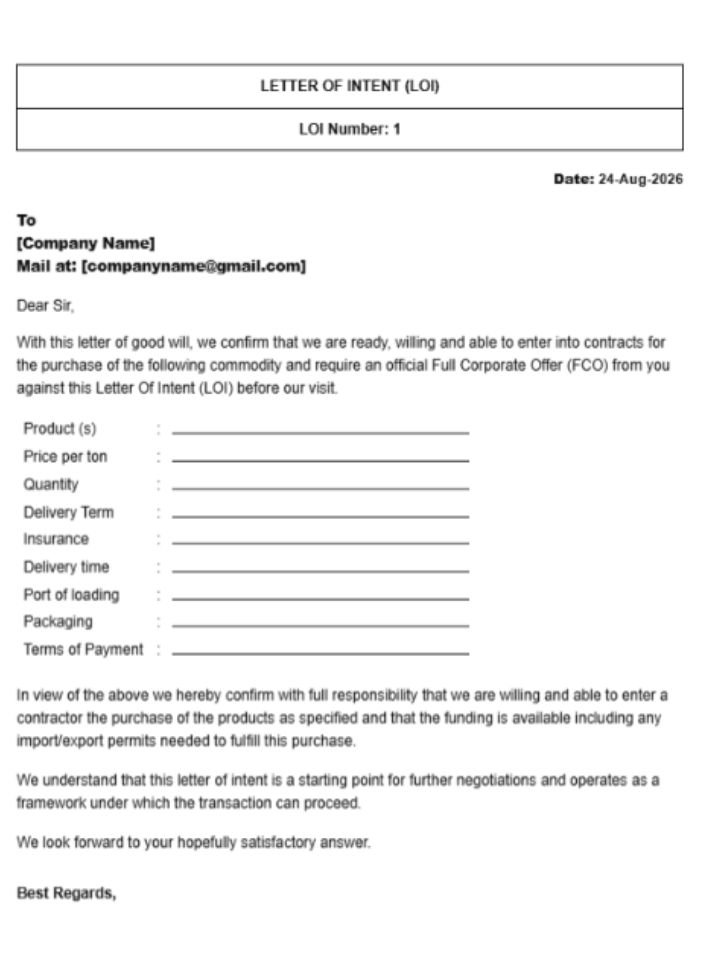
Letter Of Intent
Letter Of Intent
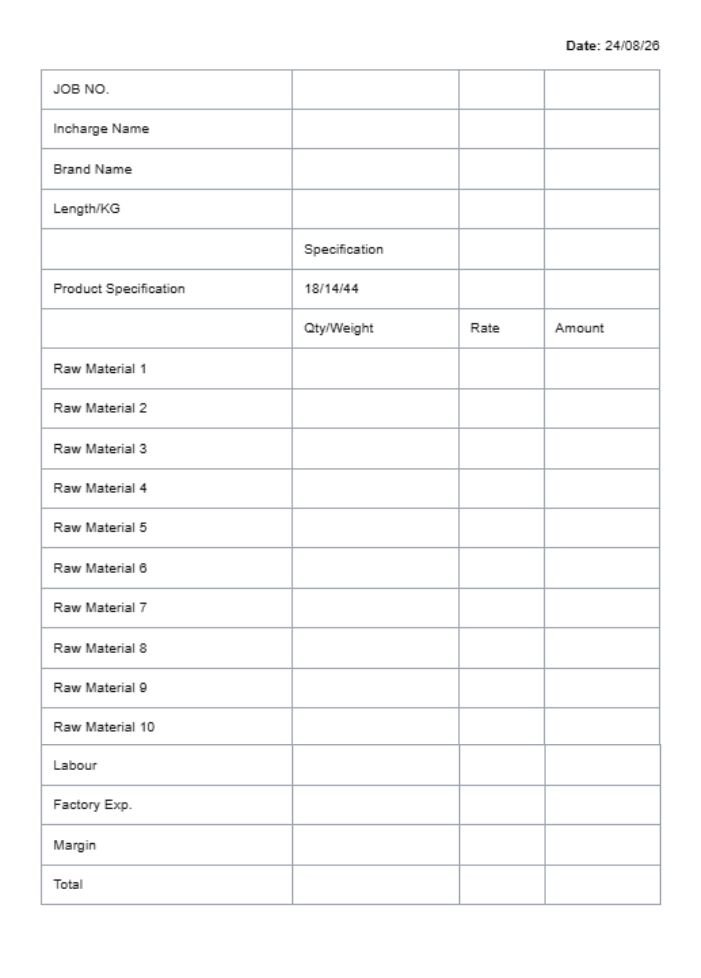
Job Work Letter
Job Work
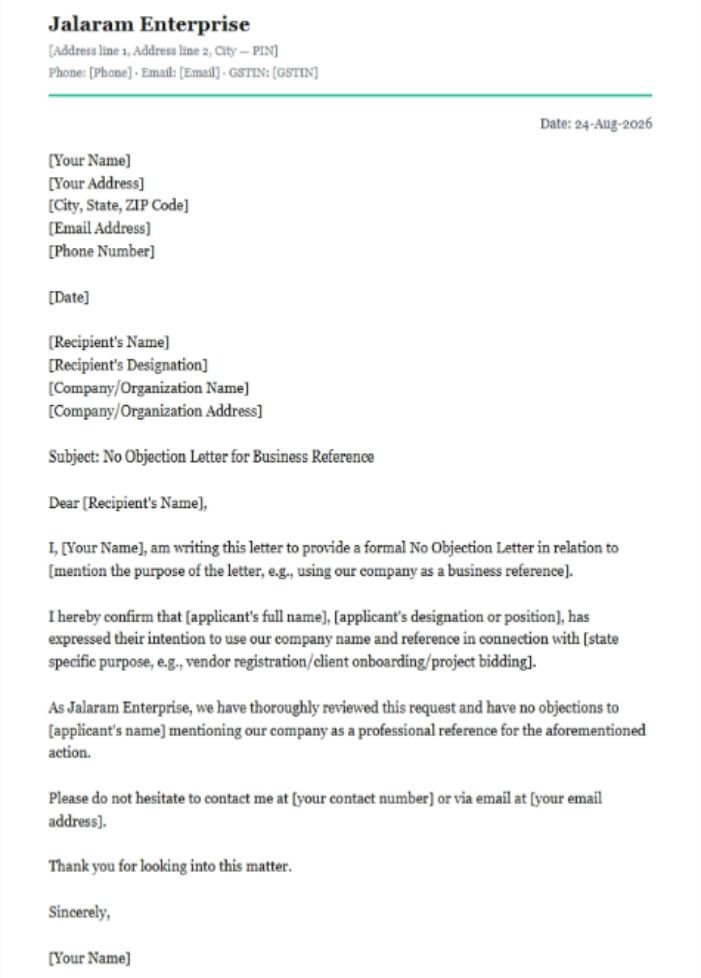
No Objection Letter
No Objection Letter
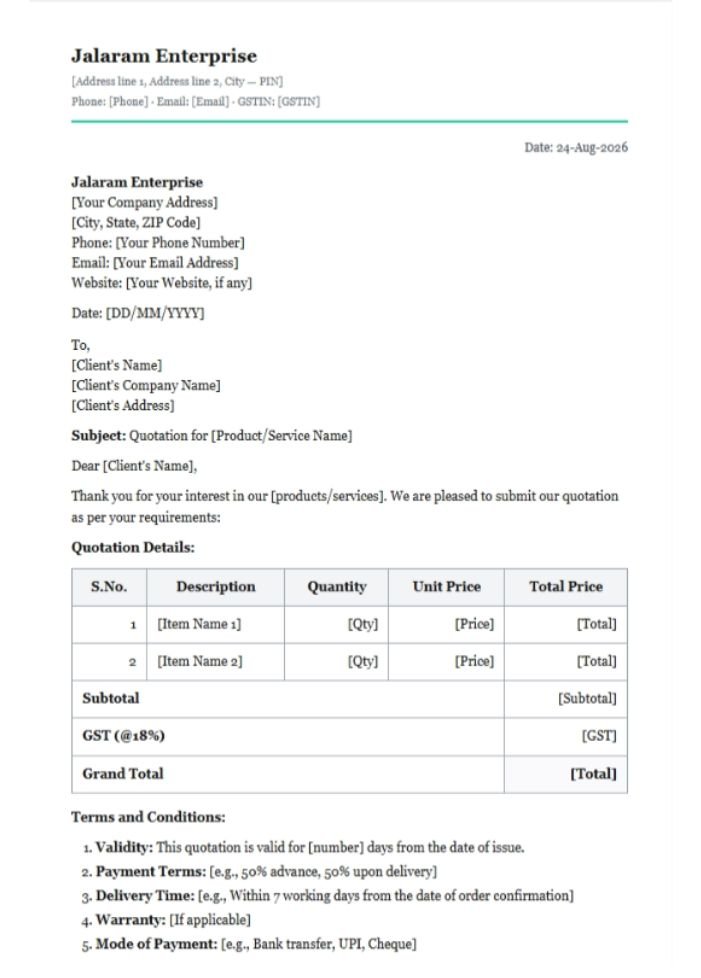
Quotation
Quotation
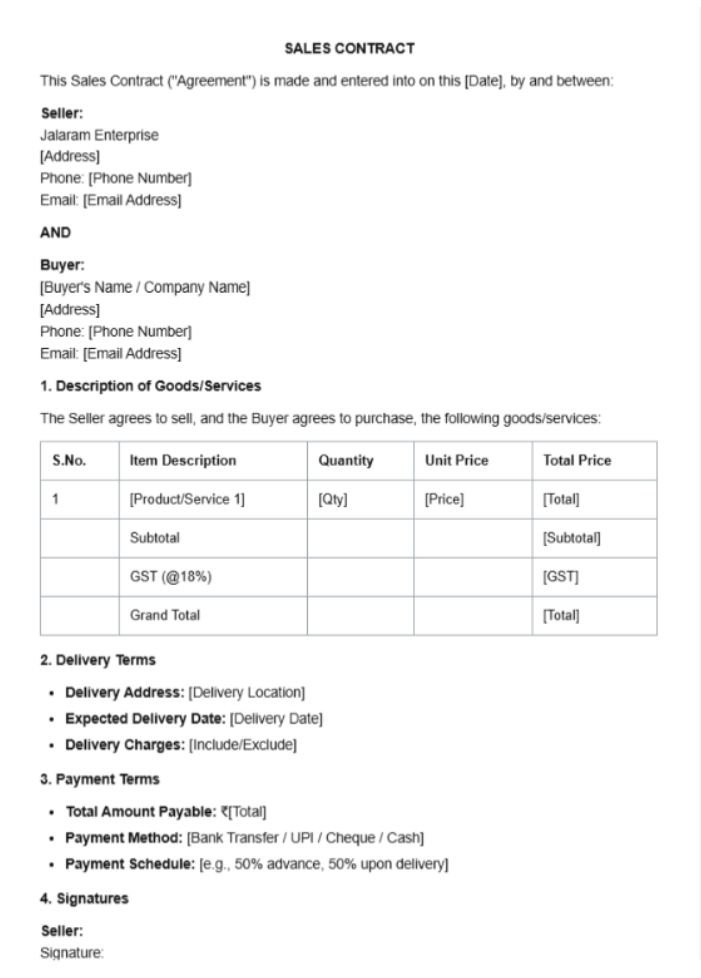
Sales Contract
Sales Contract
Letter Content
PNG / JPG / GIF / WEBP, up to 2 MB. Leave empty to use your business logo.
PNG / JPG on transparent bg works best. Max 500 KB.
Click any table cell for row / column / colour options
Cell Color
Horizontal Align
Vertical Align
Header Column
Insert Column On Right
Insert Row Below
Merge Cells
Remove Row
Remove Column
Click any row label or column header to rename it. Hover a row or column to see the remove (×) button. Empty cells stay blank on the printed letter.
Other Documents Report
Consolidated report across quotations, proformas, sale & purchase orders, delivery challans, packing lists, credit & debit notes and job work
Documents
DateTypeDoc #PartyStatusAmountNotes
Choose filters and click Search
Multi Currency Invoice
0 selected
You don't have any Multi Currency Invoice
Invoice No Customer Invoice Date Type Currency Total (FX) Total (₹) Action
Loading…

Create Multi Currency Invoice

Customer Information
Invoice Detail
Export Shipping Detail
Product Items
Discount:
Add Product / Services
Add Additional Charges
Custom Columns
SR. Product / Other Charges HSN/SAC Code Qty. / Stock UOM Price Discount CGST SGST IGST Total
Total Inv. Val 0 0 0 0 0 0 0
Terms & Condition / Additional Note
Taxable0
Total Taxable0
Total Tax0
Round Off 0
Grand Total0
Total in words
ZERO ONLY
Service Request
0 selected
You don't have any Service Request
SR No Date Customer Item / Device Priority Status Expected Action
Loading…

Create Service Request

Customer Information
Service Request Detail
Device / Item Details
Payment
Notes
Profit & Loss
All Time
Total Revenue
₹0
Total invoiced to customers
Purchase Cost
₹0
Total paid to suppliers
Expenses
₹0
Overhead
Gross Profit
₹0
0% margin
Top selling items
#Item nameQty soldRevenue
No sales data yet
Top purchased items
#Item nameQty purchasedTotal cost
No purchase data yet
Expenses
DateCategoryDescriptionAmountActions
No expenses recorded yet
Other Income
You don't have any Other Income
OR
Income No Date Category Title Payment Type Amount Action
Income Category
You don't have any Income Category
Sr Name Enabled Action
Import Other Income
Add Income
Income Detail
Income Items
SR. ITEM NAME PRICE (RS)
Total Inv. Val 0
Round Off
0.00
Grand Total
0
Total in words
ZERO RUPEES ONLY
Payment Type*
Daily Expenses
You don't have any Daily Expenses
OR
0 selected
Expense No Title Amount Category Expense Date Payment Type Action
Select Columns to Display
Salary Management
Total employees
0
Active
0
On leave / inactive
0
Total daily rate
₹0
Sum of all active day rates
Employees
No employees yet
Add your first employee to start managing payroll.
Pick a month to log attendance.
D Day shift N Night shift L Leave − Off / not marked Click a cell to cycle · Sun / weekly-off days are tinted
Pick a month to log attendance
Track each employee's day / night / leave day-by-day.
Then sync to Payroll and the shift counts fill in automatically.
Pick a month to load payroll.
Employees
0
Total gross
₹0
Total net payable
₹0
Already paid
₹0
0 employees
Pick a month to view payroll
Every active employee will appear here.
Enter their day/night shift counts and mark as paid.
Employee Day Sh. Night Sh. OT Hrs Leaves Advance Bonus Deduct Gross Net Status Action
Total advances given
₹0
Adjusted (recovered)
₹0
Outstanding balance
₹0
Pending to recover from salaries
Entries
0
Employee balances
No advances recorded yet
Give an advance to an employee and it will show up here.
Advances are automatically deducted from the employee's next salary.
Date Employee Amount Mode Reference Status Notes Action
Click any cell to view or edit that employee's salary for that month.
Months in view
0
Records
0
Total salaries
₹0
Pending payments
₹0
0 records unpaid
No salary records in the selected range
Add employees, then go to the Payroll tab, pick a month and click Generate All to auto-create salary rows for everyone.
Expense Category
You don't have any Expense Category
Name Status Action

Add Expense

Expense Detail
Expense Items
Discount :
Manage Columns
SR. Item Name Qty. / Stock UOM Price (Rs) Discount IGST CESS Total
Total Inv. Val 0 0 0 0 0 0
Total Taxable0
Total Tax0
Round Off 0
Grand Total0
Total in words
ZERO RUPEES ONLY
Payment Type*
Business settings
Application Settings
Account Settings
Settings
Company Logo
Shown on invoices & bills
Logo
JPEG, PNG or WebP · Max 2 MB
Make Default Company
Auto-selected when you log in
Note : By switching it ON, this company will be selected by default while logging in
Organisation Detail
This phone number will be printed on the invoice.

Banks

Create dynamic QR codes on Invoices at ZERO Transaction charge!

Link your UPI ID with the Bank Account now to generate dynamic QR codes on Invoices and Bills.

Payments will be settled to your bank account linked with UPI ID instantly.

Please Note
  • iUPI ID can be added while adding the bank to show QR code on invoices along with the bank details.
  • iBeneficiary Name, Swift Code etc.. can be added in the notes section while adding the bank details.
  • iIf your payment gateway is active then you will not be able to edit the Account number, IFSC code of the bank details.
  • !Deleting the bank account from here will remove the bank details from all existing invoices and it is irreversible.
Bank Details
Bank Detail
Bank Detail 2
Bank Detail 3
Bank Detail 4
Bank Detail 5
Bank Print Options
Stock Priority
Auto-disable out-of-stock items for sale
When ON, any item with 0 stock is automatically hidden and blocked in Create Sale Invoice. It still appears in Create Purchase Invoice so you can restock it — and once purchased, it becomes sellable again automatically.
Stock Options
Serial Number Setting
If Strict Mode is enabled, you have to specify serial numbers for each quantity.
Batch Setting
Field Name Batch Type Status Required Print Input Option
Text — — —
Text —
Text —
Date
Date
Enable Batch Options For Other Documents
Digital Stamp / Signature
Shown above Authorised Signatory on invoices
Stamp
JPEG, PNG or WebP · Max 2 MB · PNG transparent recommended
Theme Mode
Choose how the interface appears — always light, always dark, or automatically switching.
Logo and Signature Setting
Upload images used across your invoices & bills. Toggle which ones print.
Logo
Signature image
Invoice background image
Invoice footer image
General Setting
Note: In Custom File name formatting, you can use the following tags : {{doc-type}} {{doc-id}} {{company-name}} {{contact-name}} {{date}} {{time}}
Discount Setting
Number Setting
E-Invoice supports 3 digit decimal & E-Way Bill supports 2 digit decimal
E-Invoice supports 3 digit decimal & E-Way Bill supports 6 digit decimal
E-Invoice supports 2 digit decimal & E-Way Bill supports 2 digit decimal
E-Invoice supports 3 digit decimal & E-Way Bill supports 3 digit decimal
E-Invoice supports 2 digit decimal & E-Way Bill supports 2 digit decimal
Bill of Supply Setting
Document Conversion Settings
Keyboard Shortcuts
Enable global shortcuts for faster navigation
Shortcut reference
Ctrl+QAdd New Product / Item
Ctrl+BCreate New Bill / Invoice
Ctrl+IGo to All Sale invoices
Ctrl+MGo to Customers
Ctrl+KGo to Stock / Items
Ctrl+PGo to Purchase
Ctrl+EGo to Expenses
Ctrl+GGo to GST Report
Ctrl+HGo to Dashboard (Home)
Ctrl+,Go to Settings
EscClose modal / sidebar
Shortcuts are blocked when typing inside an input or textarea.
Toggle the switch above to enable shortcuts
Sticky Save Buttons
Pin the Save / Save & Print buttons to the bottom of the screen when creating or editing invoices, quotations, purchase bills, credit & debit notes and more — so the primary action is always one click away on long forms.
Chatbot Floating Button
Show or hide the Billing Saathi chat button (the round floating button or the BS Agent tab). Turn this OFF if you want a distraction-free workspace and prefer opening the chat only when needed. Your choice is saved to your account and syncs across devices.
Chatbot Button Style
Choose how the chat button looks on desktop. On mobile the round button is always used. Your choice is saved to your account.
Account Information
—
—
Active
Security & Password
Change Password
Update your account password
Your session stays active after the password is changed.
Password Rules
Your password must meet these requirements
At least 8 characters
Longer passwords are much harder to crack
One uppercase letter (A–Z)
Mix of upper and lowercase improves security
One lowercase letter (a–z)
Required for a balanced password
One number (0–9)
Adds numeric complexity
One special character
e.g. ! @ # $ % ^ & *
Change Email Address
— !
Logged in Devices
#NameDeviceBrowser PlatformLast Log InLocationAction
Loading…
Login Log
#Staff IDDeviceBrowser PlatformLast Log InLocation
Loading…
Bill Customization
Design, colours, fonts & visible fields — for each document type
Design / Layout
Colour Theme
These colours are used on printed and viewed bills. Pick a preset or use the colour picker for an exact brand match.
Typography
Fields to show (toggle what appears on the bill)
Live preview
Loading preview…
This is a simplified preview. The actual printed bill uses your real data. Sale & Purchase bills print as full A4; Receipt / Journal / Contra print as vouchers.
Appearance & Language
Choose your theme and the language for the app interface
Theme
Switch between a light or dark interface
Language
Interface language for menus, labels and buttons
Best Value
for Growing Business
Membership Plans

Choose the Plan That Fits Your Business

Get the right features to manage your billing, inventory and business operations smoothly.
Upgrade anytime and unlock more powerful features.

LIFETIME
FREE
Perfect for small businesses to get started
  • No ads, No Branding
  • Sales & Purchase Invoice
  • Customer & Product
  • Inventory
  • Payment Receipt
  • Mobile App
  • Phone & Email Support
  • Share on WhatsApp
  • Max 25 Items In Doc.
  • Max 3000 Doc. /Year
PREMIUM
More features. More power. More growth.
Rs. 999+ 18% GST
Invoicing, Reports, Email & More
  • No ads, No Branding
  • Sales & Purchase Invoice
  • Customer & Product
  • Inventory
  • Payment Receipt
  • Mobile App
  • Phone & Email Support
  • Share on WhatsApp
  • Max 250 Items In Doc.
  • Max 15000 Doc. /Year
  • Share on Email
  • E-Way Bill
  • E-Invoices
  • Quotation
  • Proforma Invoice
  • Delivery Challan
  • Shipping Label
  • Cheque Printing
  • Purchase Order
  • Sale Order
  • Job Work
  • Credit / Debit Note.
  • Activity Log
  • Import Customer & Product
  • Reports
  • GST Return Filling Reports
  • Export/ SEZ Invoices
  • Daily Income / Expense
  • 10 Staff Account
  • Invoice Header Design
  • Multiple Invoice Template
  • Thermal Printing
  • Document Conversion
  • Document Duplicate
  • Tally Integration
By clicking upgrade, you are agreeing to the Terms and Privacy Policy.
Membership Details
Membership TypeExpires OnLast Payment
Free----
Payment Details
Payment ForPayment DateAmountTransaction IDPayment Type
No records found.

Try Premium free for 1 month

Unlock every section — Expenses, Other Documents, Reports, templates, reminders and more. No payment, no card.

  • Every Premium feature unlocked for 1 month
  • No payment or card needed
  • When it ends you’re back on the Free plan — nothing is lost
  • One free trial per email address and mobile number
Credits 0
Purchase Credits
10 Credits
FREETrial Pack
100 Credits
₹ 100+ 18% GST
500 Credits
₹ 500+ 18% GST
Credit Usage
ParticularsActionCredits
E-Way billGenerate1 Credit
E-Way billCancel0 Credits
E-InvoiceGenerate1 Credit
E-InvoiceCancel0 Credits
SMSReminder0.5 Credit
Purchase UploadGenerate1 Credit
E-way Bill & E-Invoice Setting
GSTN Portal Credentials
E-Way Bill API
E-Invoice API

These credentials are stored only for your business and used when generating E-Way Bills or E-Invoices through the GST portal API. Leave blank to disable API calls.

WhatsApp Settings
Whatsapp Log
FromToStatusSent OnAction
No results
Staff Accounts
NameUser IDEmailPhoneStatusAction
No staff accounts yet — invite a teammate to collaborate.
Go Drive

Auto-back up your invoices, customers and product data to Google Drive every day. Connect once and stay covered.

Not Connected
Export To Excel
TitleItem DetailExclude CancelledAction
Customer / Vendor
Products
Transports
Stock
Sale Invoice
Purchase Invoice
Delivery Challan
Quotation
Proforma Invoice
Purchase Order
Sale Order
Job Work
Credit Note
Debit Note
Payment Receipt
Daily Expense
Other Income
Full Backup
Includes all items, customers, invoices, purchases & expenses (with embedded logo / stamp)
Last backup: Never
Auto-Backup Schedule

A backup runs every day at the time you choose and is stored on the server. Only the number you pick is kept — as each new backup is made, the oldest beyond that number is deleted automatically.

Stored Auto-Backups
Loading backups…
Import Backup

Restore data from a previously exported backup file (.json) or a CSV/Excel sheet. Duplicate customers, items and invoices are skipped automatically — your existing data is never overwritten.

Drop your .json, .csv or .xlsx backup file here, or
File ready to import
Activity Log

Recent user activity in your business — logins, document changes, settings updates and more.

UserActionDateReference
Loading activity…
Email Options
Send Email via SMTP or API

Email Notifications
EventTypeEmail AddressEmail
All Manual Email
(Document, Report, Reminder etc.)
BCC
All Manual Email
(Document, Report, Reminder etc.)
CC
Email Log
FromToEmail StatusSent OnAction
No results
Payment Gateway
Razorpay
Stripe
UPI
Print Template

Select Document Type

Choose a document to customize its print template.

Sale Invoice
Delivery Challan
Quotation
Proforma
Purchase Order
Sale Order
Job Work
Credit Note
Debit Note
Purchase Invoice
Multi Currency Invoice
Payment Receipt
Inward Payment
Outward Payment
Daily Expense
Other Income
Letters
Packing List
Service Request
Manufacture
Print Options v3.9.63

Pick a document below, then turn fields on or off to control what appears on its printout. Changes save automatically.

Sale Invoice
Sale Return
Purchase Invoice
Purchase Return
Sale Order
Purchase Order
Quotation
Proforma
Delivery Challan
Packing List
Credit Note
Debit Note
Job Work
Manufacture
Multi-Currency Invoice
Service Request
Receipt (money in)
Journal
Contra (cash ⇄ bank)
Document Options

Note: In Prefix and Postfix, you can use the following tags : {{mm}} (06), {{mmm}} (Jun), {{yy}} (26), {{yyyy}} (2026)

Sale Invoice
Delivery Challan
Quotation
Proforma
Purchase Order
Sale Order
Job Work
Purchase Invoice
Credit Note
Debit Note
Multi Currency Invoice
Payment Type
Letter Options
Inward Payment
Outward Payment
Other Income
Daily Expense
Service Request
Manufacture
Terms and Condition

Default terms & conditions printed on each document type. Leave blank for none.

Shipping & Envelope Options
Shipping Options
Envelope Options
Translation Options

Rename the labels printed on your documents — useful if your business operates in a regional language. Click a section below to expand it.

Document Header
Document Footer
Sale Invoice
Export Shipping Detail
Purchase Invoice
Quotation
Jobwork
Delivery Challan
Sale Order
Purchase Order
Packing List
Manufacture
Product Details
Bank Details
Email & Whatsapp Templates

Click here to view available dynamic tags for use in the email subject and body.

Payment Reminder
Colour / Font

Personalise how the entire plugin looks — pick your own brand colour, dark-mode colours, dashboard chart colours, and a font family. Or choose one of the ready-made palettes below.

Light Mode — Main Palette
Colours used when the interface is in the standard light theme.
Header, active menu, primary accents
Save / Create / action buttons
Purchase, secondary highlights
Profit tags, small accents
Titles, big numbers, labels
Paragraphs, secondary text
Dashboard Analytics Colours
Colours used by the bar charts, line graphs and KPI badges on the dashboard.
Sales bars & area
Purchase bars & area
Expense bars & area
Profit indicators
Loss indicators
Dark Mode Colours
Colours used when the interface switches to the dark theme. Defaults are tuned for high contrast & comfortable reading.
Brighter than the light-mode brand so it reads on dark backgrounds
Background of cards, modals, panels
The page itself, sits behind cards
Titles & primary text
Paragraphs & secondary text
Card borders & dividers
Font Family
Choose the typeface used across the plugin. Fonts are lazily loaded from Google Fonts (except the default).
Recommended by us
Balanced palettes — click any card to apply it instantly
Select Tab

Choose which tabs appear in the top tab bar. Turn any tab off to hide it — hidden tabs also disappear from the mobile hamburger drawer. Dashboard and Settings are always shown. Press Reset to restore all tabs.

Design Custom Header

Create a professional header for your document

Add Text Enter and customize your text content
0/5000 characters
Add Image Upload an image or choose from recent images
Click to upload or drag and drop an image into this panel PNG, JPG, JPEG, WEBP (Max. 5MB)
Recent Images
Select Layout
Choose from Designs Pick a category to explore beautiful pre-designed elements
Manage Layers Drag to reorder layers  ·  Double-click a name to rename
# 16 Letter Spacing 0 Line Height 1.25
Options
Use your own header
When on, you upload a ready-made header image instead of designing one here.
Upload Header
Image
Click To Upload .jpg, .jpeg, .png
Use a wide strip — 1600 × 320 px works best. Width 900–3000 px, shape between 5:1 and 14:1. It prints edge to edge across the top of the page.
Download Designed
Image
Note : For Download Updated Design Please save your Changes First.
Data & Backup
Export, import or backup all your business data
Export Data
Download your data as Excel (.xlsx), CSV, or JSON
All Data
Items / Stock
Customers
Invoices
Purchases
Expenses
Excel (.xlsx)
CSV
JSON
Import Data
Restore from any Billing Saathi export — supports .xlsx, .csv and .json. Duplicate items/customers are skipped automatically.
Drop your .xlsx, .csv or .json export file here, or
File ready to import
Full Backup & Auto-Backup
Create manual backups or schedule daily auto-backups. Up to 5 backups stored — oldest removed automatically.
Includes all items, customers, invoices, purchases & expenses
Last backup: Never
Auto-Backup Schedule
Time:
Auto-backups run daily at the chosen time and are stored securely on the server. Max 5 backups — oldest removed automatically.
Stored Auto-Backups
Loading backups…
Notifications
Date Description Action
Loading notifications…
Upgrade Now

Unlock More
Power for Your
Business

Upgrade to a premium plan and get advanced features to manage your business smarter.

More FeaturesBetter ReportsPriority Support
Rs. 2997
RS. 999
+ 18% GST
Save Rs. 498 with 3 Year Plan!
  • All Premium Features
  • Secure & Reliable
  • Priority Support
  • Keep Your Data Safe
Secure Payment VisaMastercardUPIRazorpay

By clicking upgrade, you are agreeing to the Terms and Privacy Policy.

Hi! Ask me anything
Billing Saathi Chat
Choose your preferred language
Powered by Diginest Solution
Billing Saathi logo
Billing Saathi Chat
Hello
How can I help you today?
Billing Saathi Chat can make mistakes. Double-check replies.
Powered by Diginest Solution
Recent chats

Add New Company

+
Upload Logo
This is branch of an existing company.
Select Invoice Header Layout
Choose a category and select a professional header design for your invoices

General — Invoice Header Layouts

Professional and clean invoice header designs for all types of businesses.